A Chapter Approved Tournament Mission battle is waged by following the sequence below.
1. Muster Armies Muster armies as described in the Core Rules.
INCURSION MISSIONS In an Incursion mission, we suggest the following changes to the Muster Armies rules for a better experience for both players. ■ Your army can contain up to two units with each datasheet name – or up to four units with each datasheet name if it is a BATTLELINE or DEDICATED TRANSPORT unit. ■ Your army can contain up to one TITANIC CHARACTER.
2. Determine Mission Instead of shuffling and drawing from the Deployment and Primary Mission decks, players should use the pre-generated missions from the Chapter Approved Tournament Mission Pool. Set aside the Secondary Mission cards deck as normal (players will receive these later).
3. Read Mission Read the Primary Mission. The Primary Mission card details how and when you score Victory points (VP), and may also apply additional conditions to the battle. You can also score VP by achieving Secondary Missions (described later). Twist cards and Challenger cards will not be used.
4. Place Objective Markers Players now set up objective markers on the battlefield. Each Deployment card’s deployment map will show players how many objective markers to set up and where each should be placed. In Chapter Approved Tournament Missions, models can end any type of move on top of an objective marker.
Designer’s Note: In the Warhammer 40,000 Core Rules, objective markers are physical artefacts that models cannot end a move on, representing vital data caches, xenos relics, Chaos portals or anything else that suits your narrative. While this adds to the cinematic nature of the battlefield and offers exciting hobby opportunities, it can sometimes result in model-positioning circumstances that not everyone will enjoy equally. As such, these guidelines recommend treating objective markers as flat, circular markers 40mm in diameter that offer no impediment to the movement or placement of models.
5. Create the Battlefield Players now create the battlefield and set up terrain features. Missions are played on rectangular battlefields whose dimensions are approximately 44"by 60". When setting up terrain features, use the guidelines detailed in the Terrain Layouts section of this pack. Players must use the rules for terrain features detailed in the Core Rules. While other approaches to terrain layout may work within the collections of experienced organisers, we recommend these terrain guidelines when otherwise in doubt.
6. Determine Attacker and Defender Look at the Deployment card drawn and agree which edges of your battlefield are the Attacker’s and Defender’s battlefield edges. Roll off:the winner decides who will be the Attacker and who will be the Defender.
7. Select Secondary Missions Secondary Mission cards detail additional ways to score VP, and must be used either as Fixed or Tactical Missions. Players now secretly note down whether they will use Fixed or Tactical Missions; if using Fixed Missions, they must also note down which two Fixed Missions they will use (see below). Players then reveal these decisions and proceed accordingly.
Fixed Missions
Fixed Missions are goals that remain throughout the battle, and can be achieved multiple times.
Fixed Missions are those marked with the symbol shown below. After revealing the two Fixed Missions you will use, set aside the remainder of your Secondary Mission deck (it will not be needed during the battle). Your selected Fixed Mission cards cannot be discarded for any reason other than the Adapt or Die Mission Rule card.

Tactical Missions
Tactical Missions are replenished at the start of your Command phase, and are discarded once achieved.
After revealing that you will use Tactical Missions, shuffle your Secondary Mission deck.
If you are using Tactical Missions:
At the start of your first Command phase, draw two cards from your Secondary Mission deck; those two Secondary Mission cards are active for you until you achieve them. At the start of each of your subsequent Command phases, if you have fewer than two active Secondary Mission cards, draw from your Secondary Mission deck until you have two active Secondary Mission cards.
At the end of your Command phase, you can spend CP to use the New Orders Stratagem below.
At the end of each player’s turn, each player using Tactical Missions does the following, starting with the player whose turn it is:
Then, you can discard one or more of your active Secondary Mission cards. If you do, and it is your turn, you gain 1CP.
First, if you scored 1 or more VP from a Secondary Mission card, discard that Secondary Mission card – it is achieved.
If your Secondary Mission deck runs out, you cannot generate any additional Secondary Missions during the battle.
8. Declare Battle Formations Players secretly note down which of their Leader units will start the battle attached to which Bodyguard units, which of their units will start the battle embarked within which TRANSPORTS, and which of their units will start the battle in Reserves (including Strategic Reserves). Players then reveal these decisions.
Reserves Restrictions
No more than half of the units in your army can start the battle in Reserves, and the points total of those units cannot be more than half of the points total of your army (units embarked within a TRANSPORT that is set up in Reserves also count towards these limits).
Reserves units cannot arrive on the battlefield during the first battle round (excluding units placed into Strategic Reserves during the battle).
Any Reserves units that have not arrived on the battlefield by the end of the third battle round count as having been destroyed, as do any units embarked within them (excluding units placed into Strategic Reserves during the battle).
9. Deploy Armies Players take it in turns to set up their remaining units one at a time, starting with the Defender. A player’s models must be set up wholly within their deployment zone. If a player sets up a TITANIC unit when it is their turn to set up a unit, they skip their next turn to set up a unit. If one player finishes deploying all of their units, their opponent then deploys the remainder of their units.
10. Redeploy Units Some rules allow players to redeploy certain units after both armies are deployed. Unless otherwise stated, such rules are resolved in this step. Players alternate resolving any such rules, starting with the Attacker.
11. Determine First Turn Roll off:the winner takes the first turn.
12. Resolve Pre-Battle Rules Players alternate resolving any pre-battle rules units from their army may have, starting with the player who will take the first turn.
13. Begin the Battle The first battle round begins. Players continue to resolve battle rounds until the battle ends.
14. End the Battle The battle ends after five battle rounds have been completed. Even if one player has no models remaining in their army at the start of their turn, players continue to play out their turns until the battle ends.
15. Determine Victor At the end of the battle, the player with the most VP is the winner. If the players are tied, the battle is a draw. The maximum VP each player can score is 100VP. Each player scores 10VP if their army is painted to a Battle Ready standard. The maximum VP that can be scored from each source of VP is detailed on below. In all cases, any excess VP awarded above these maximums are lost.
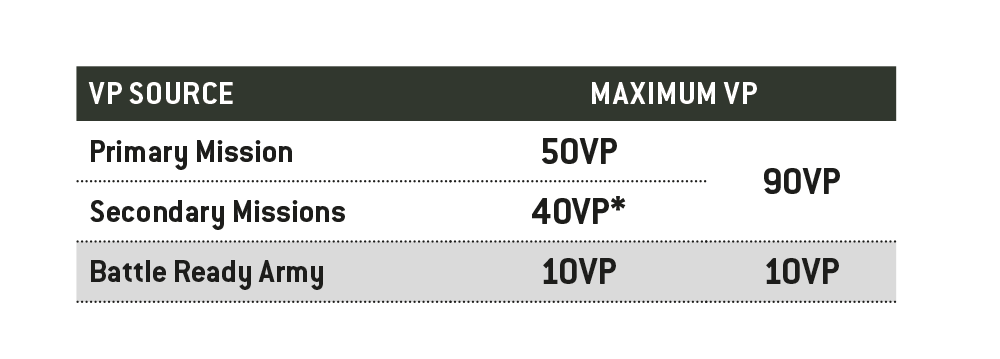
- If using Fixed Missions, 20VP maximum per Fixed Mission card.
New Orders - 1CP
When:
End of your Command phase.
Target:
One of your active Secondary Mission cards.
Effect:
Discard it and draw one new Secondary Mission card.